MCP ArchitectureModel Context Protocol

Model Context Protocol (MCP) is a standardized way for AI models to securely interact with tools, data, and services. It simplifies integration, improves scalability, and enables safer AI workflows.

Trusted by 18,000+ teams around the globe

Before MCP, The NxM Problem

MCP, Model Context Protocol

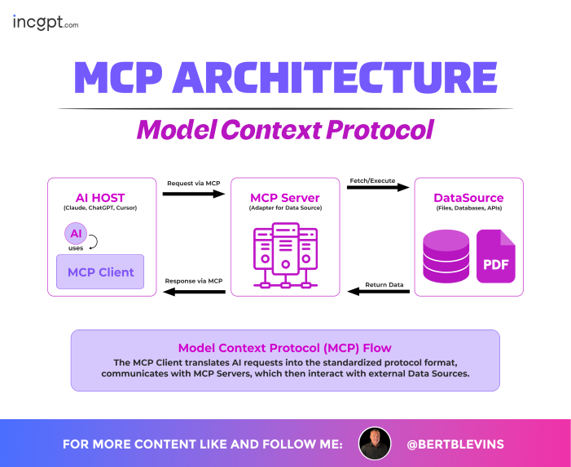
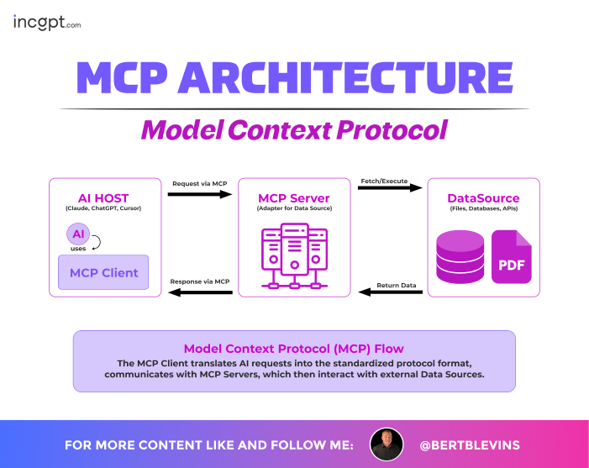
  • The Model Context Protocol (MCP) architecture is designed to facilitate communication between MCP Hosts (such as Claude Desktop, IDEs, and AI tools) and various data sources.
  • Supported data sources include local filesystems, databases, and internet-based resources.
  • MCP Clients act as intermediaries between MCP Hosts and MCP Servers.
  • MCP Clients send requests to MCP Servers for data access or operations.
  • MCP Servers process these requests and fetch data from the appropriate sources.
  • This architecture ensures seamless and efficient interaction between AI tools and data environments.
  • The key components include the MCP Client and MCP Server, supported by transport layers.
  • Additional features include notifications, sampling, tools, resources, and prompts.

Model Context Protocol, Building a Custom MCP Server

  • The overview provides a step-by-step guide to building a custom MCP (Model Context Protocol) Server using Python.
  • It explains the MCP architecture, where MCP Clients interact with an MCP Server via the MCP Protocol.
  • The MCP Server enables access to resources such as databases, services, and files.
  • The process begins with setting up the development environment.
  • Key tools and technologies include the MCP Python SDK, FastMCP, AsyncIO, and Requests.
  • It then covers creating a basic MCP Server structure.
  • The guide concludes with developing and extending the server’s functionality.

MCP Workflow, Model Context Protocol

  • The MCP (Model Context Protocol) workflow demonstrates how various AI models and agents interact with MCP.
  • Supported AI platforms and frameworks include OpenAI, Claude, DeepSeek, CrewAI, LangChain, LangGraph, CopilotKit, and LlamaIndex.
  • MCP acts as a unified layer enabling these models and agents to access external tools and data sources.
  • Integrated tools and data sources include GitHub, SingleStore, Slack, Zendesk, Snowflake, Google Drive, and Dropbox.
  • This workflow enables seamless integration, efficient data access, and streamlined data processing across systems.

Architecture Overview, Model Context Protocol

  • The Model Context Protocol (MCP) architecture overview shows how MCP Clients operate within Agent A and Agent B (MCP Hosts).
  • MCP Clients communicate with multiple MCP Servers (A, B, C, Y, and Z) using the MCP Protocol.
  • The architecture supports secure collaboration between agents.
  • It enables task and state management across interacting agents.
  • UX negotiation and capability discovery are facilitated through the A2A (Agent-to-Agent) Protocol.
  • MCP Servers connect to various data sources.
  • These data sources include Local Data Sources 1 and 2, as well as Internet Web APIs.
  • This setup enables efficient data access and interaction across systems.

MCP Server, Model Context Protocol

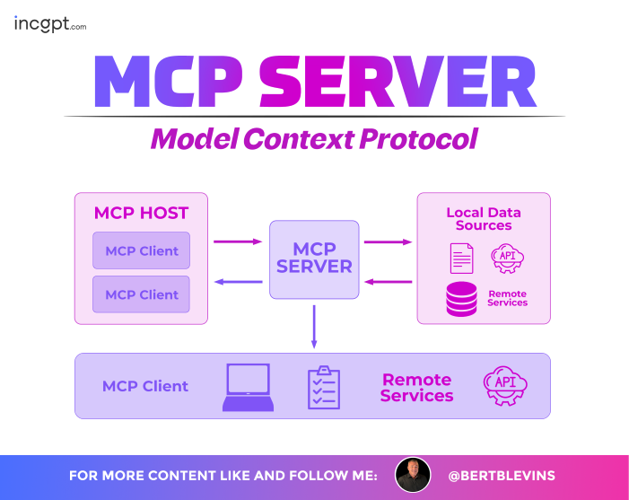
  • The MCP Server architecture illustrates how MCP Clients from an MCP Host interact with the MCP Server.
  • MCP Clients send requests to the MCP Server using the Model Context Protocol.
  • The MCP Server provides access to local data sources such as files, APIs, and remote services.
  • It also enables interaction with external and remote services via APIs.
  • The MCP Server acts as a central hub for communication and data exchange.
  • It supports multiple MCP Clients connecting to diverse data environments.
  • This architecture ensures seamless, scalable, and efficient data access across systems.
  • Engineering Team

    Lorem ipsum dolor sit amet,

  • Marketing Team

    Lorem ipsum dolor sit amet,

  • Design Team

    Lorem ipsum dolor sit amet,

AI Model Training Process, Model Context Protocol

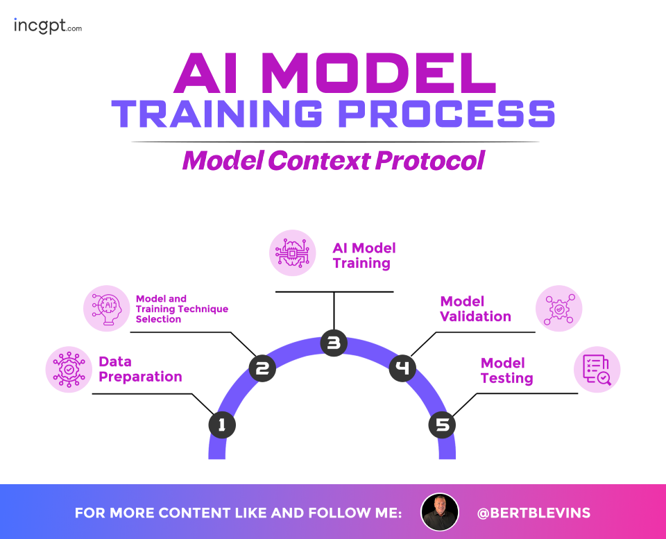
The AI Model Training Process within the Model Context Protocol presents a five-step workflow:

Each step is visually connected in a circular flow, emphasizing the iterative nature of the process, with icons representing key activities like data handling, technique selection, training execution, validation checks, and testing evaluations.

Build AI Tools With Remote MCP on Azure Functions

Model Context Protocol

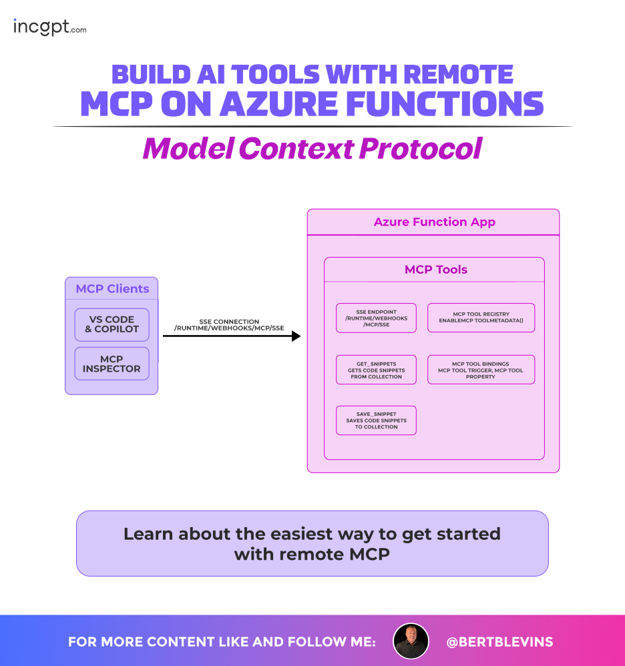
  • The process demonstrates building AI tools with a remote MCP (Model Context Protocol) using Azure Functions.
  • An Azure Function App hosts and exposes MCP tools.
  • MCP Clients such as VS Code & Copilot and MCP Inspector connect to the Azure Function App.
  • Connections are established using Server-Sent Events (SSE) and webhooks.
  • The Azure Function App provides MCP tool functionalities.
  • These include retrieving code snippets from a collection.
  • It also supports saving code snippets to a collection.
  • The app manages the MCP tool registry and associated tool metadata.

Chart Combination

Lorem ipsum dolor sit amet, consectetur adipiscing elit, sed do eiusmod tempor incididunt ut labore et dolore

Direct Sales

Lorem ipsum dolor sit amet, consectetur adipiscing elit, sed do eiusmod tempor incididunt ut labore et dolore

Real-time data

Lorem ipsum dolor sit amet, consectetur adipiscing elit, sed do eiusmod tempor incididunt ut labore et dolore

How PMC Powers AI, Model Context Protocol

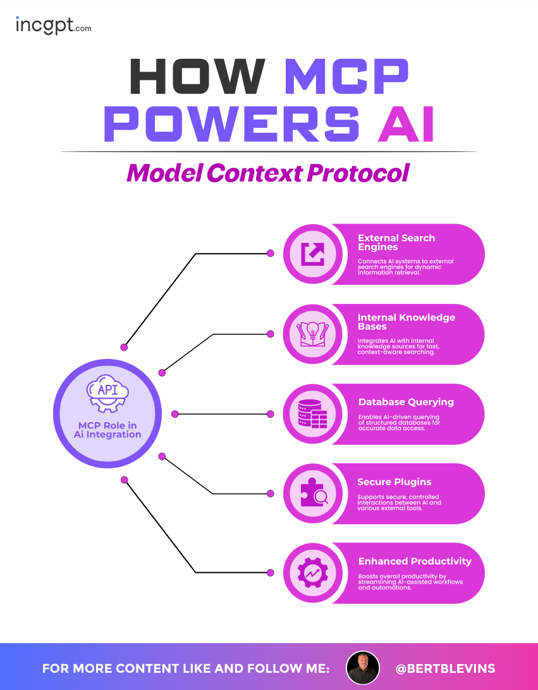
The Model Context Protocol (MCP) powers AI through its role in AI integration, with an API-centric hub connecting to five key areas: External Search Engines for dynamic information retrieval, Internal Knowledge Bases for context-aware searching, Database Querying for accurate data access, Secure Plugins for controlled interactions with external tools, and Enhanced Productivity for boosting AI-assisted workflows and automations.

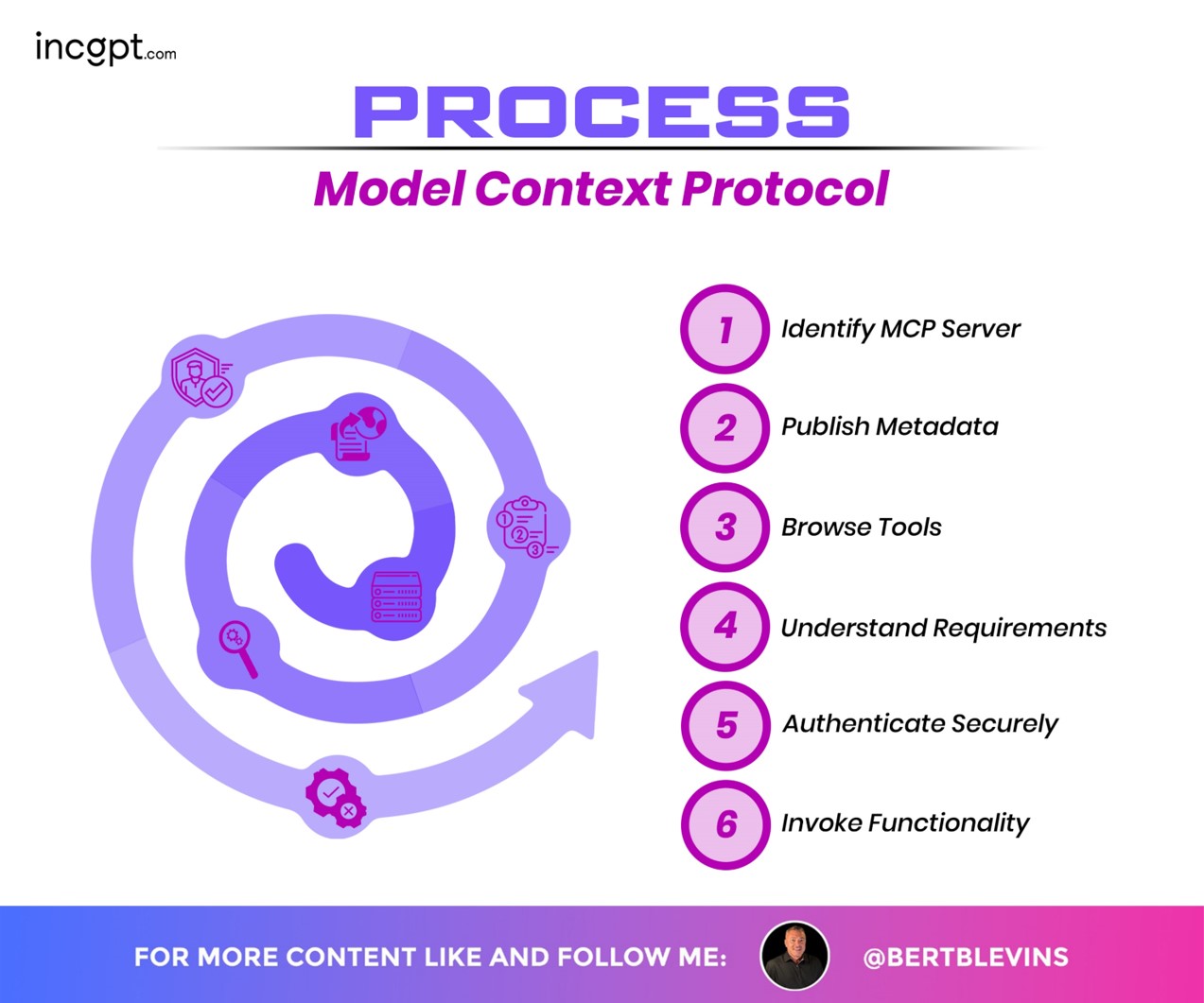
The Model Context Protocol (MCP) process is outlined through a six-step workflow depicted in a spiral design: 1) Identify MCP Server, 2) Publish Metadata, 3) Browse Tools, 4) Understand Requirements, 5) Authenticate Securely, and 6) Invoke Functionality. Each step is visually represented with icons, guiding users through the process of engaging with MCP servers, from server identification to executing desired functions.

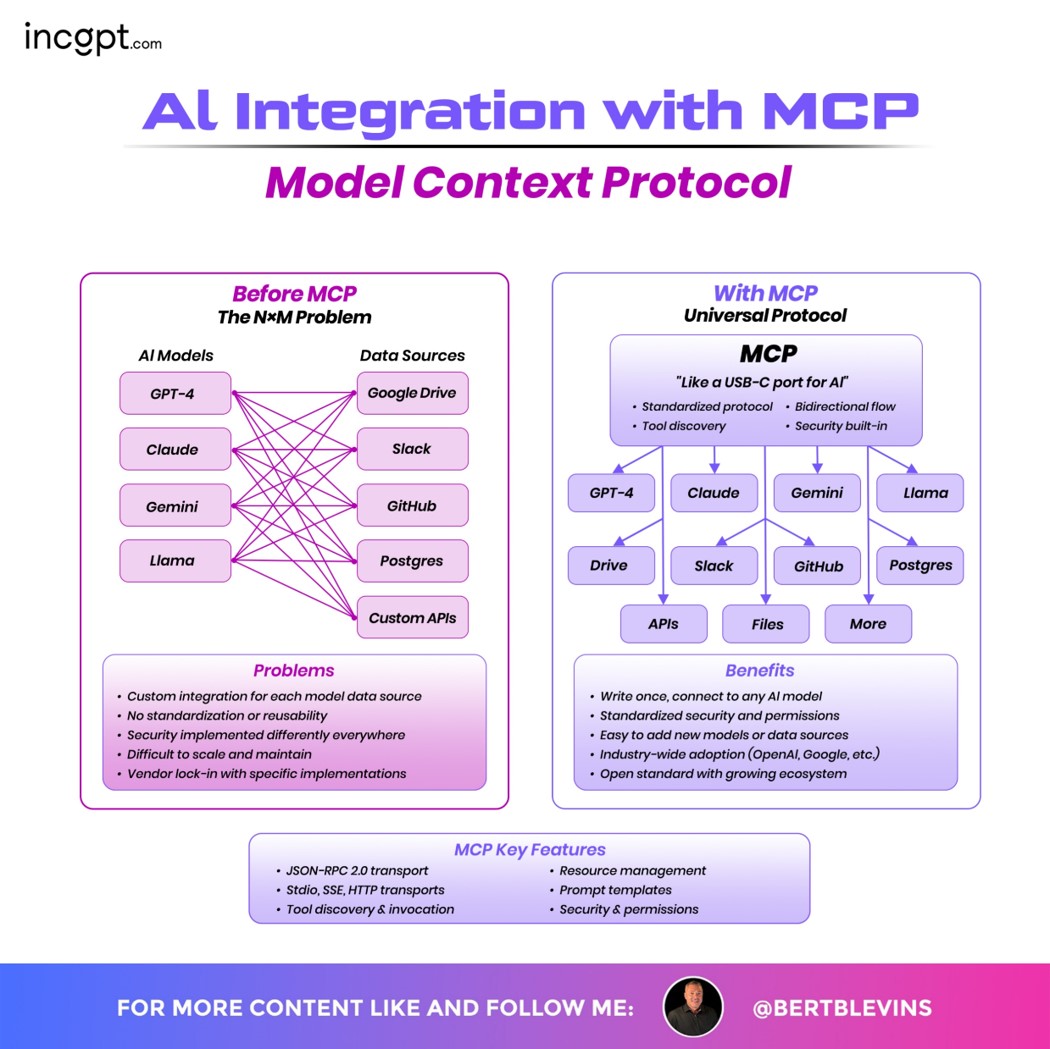
The Model Context Protocol (MCP) integration compares the pre-MCP “NxM Problem,” where AI models (GPT-4, Claude, Gemini, Llama) connect to data sources (Google Drive, Slack, GitHub, Postgres, Custom APIs) with complex, non-standardized integrations, to the streamlined “Universal Protocol” approach with MCP. MCP, likened to a “USB-C port for AI,” offers a standardized protocol, bidirectional flow, tool discovery, and built-in security, connecting models to diverse data sources like APIs, files, and more with ease. Benefits include standardized security and permissions, easy addition of new models or data sources, industry-wide adoption (e.g., OpenAI, Google), and an open standard with a growing ecosystem, supported by key features like JSON-RPC 2.0 transport, SSE/HTTP transports, tool discovery and invocation, resource management, and security with permissions.

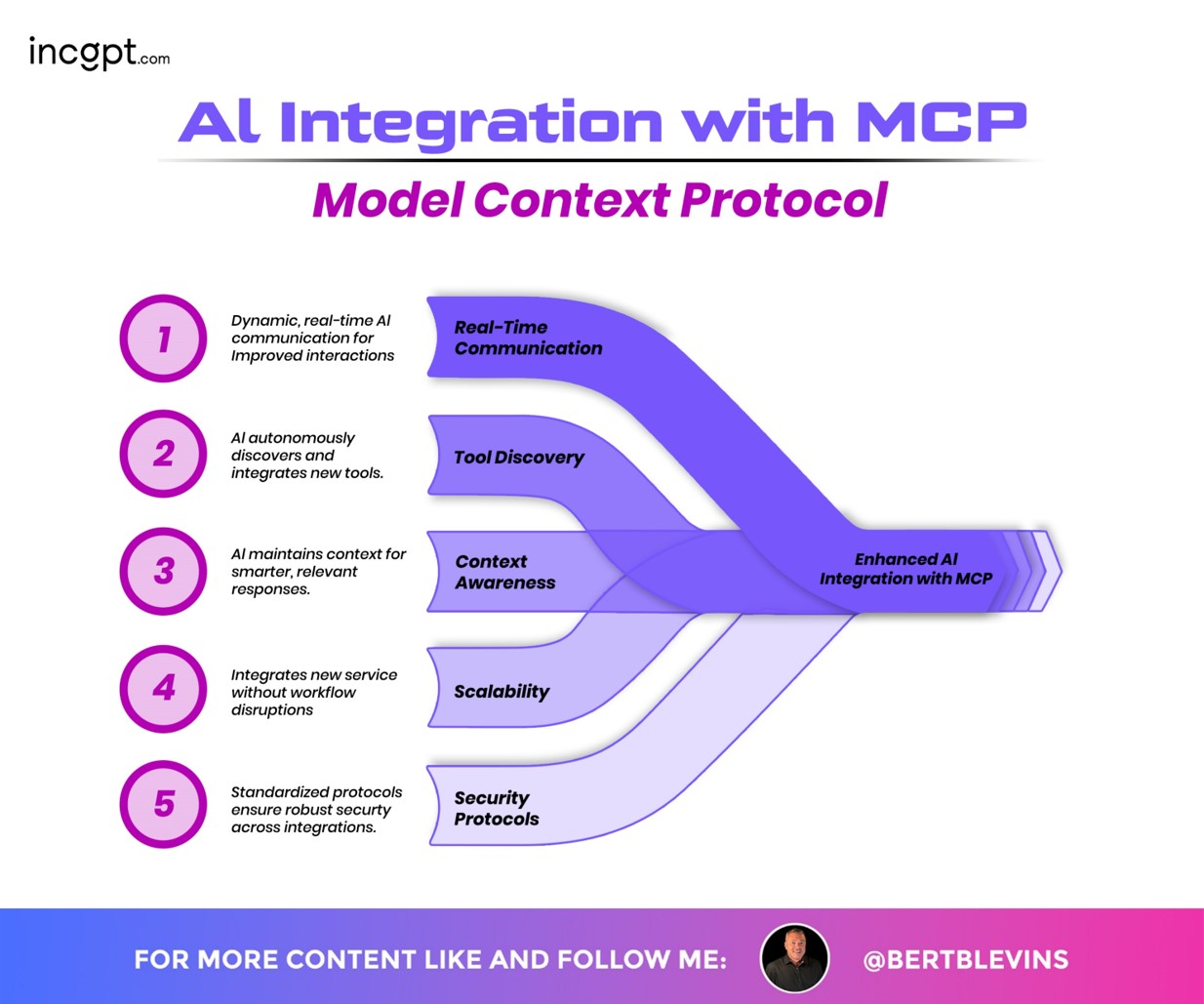
The infographic highlights how AI integration with the Model Context Protocol (MCP) enhances AI capabilities through five key aspects:

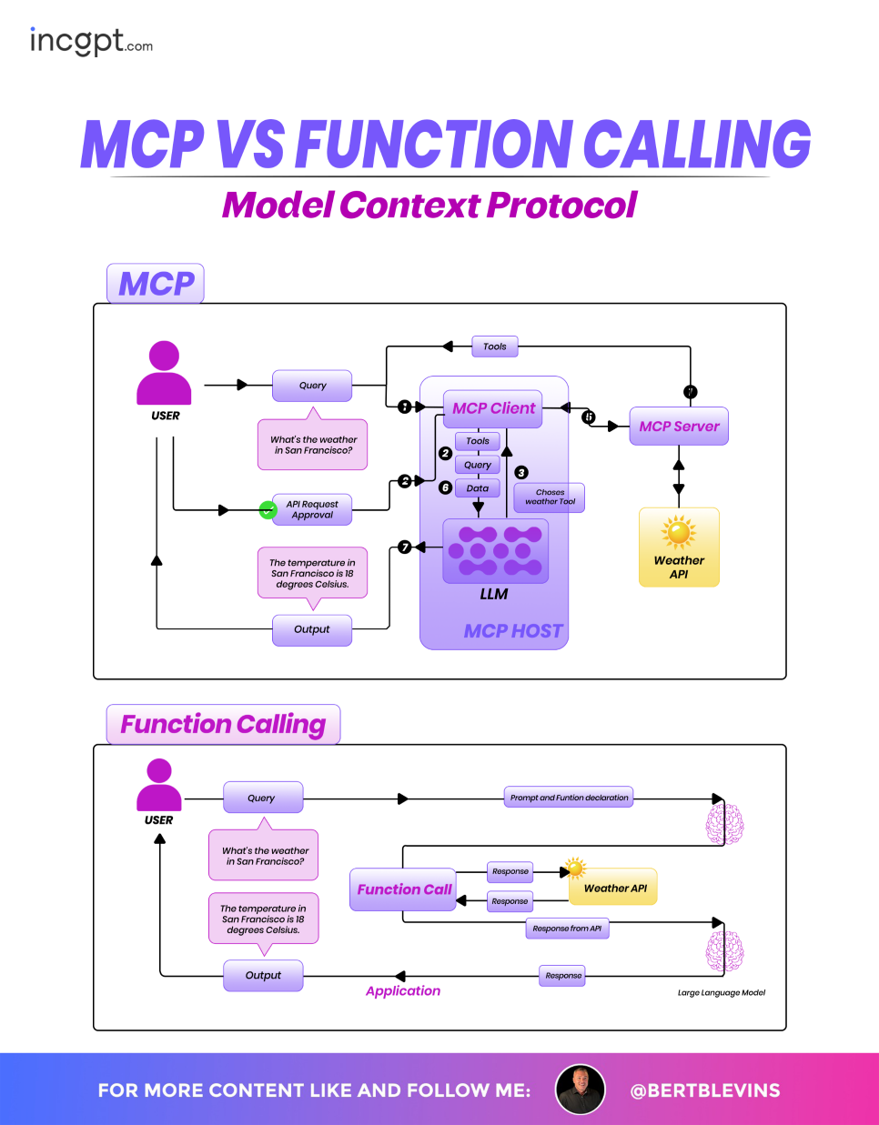
The Model Context Protocol (MCP) and Function Calling approaches for processing a user query about the weather in San Francisco are compared. In the MCP process, the user query is sent to an MCP Client within an MCP HOST, which, after API request approval, chooses a weather tool via the MCPServer, queries the Weather API, and outputs the result (18 degrees Celsius) through an LLM. In contrast, Function Calling involves the user query being processed by a Function Call application, which uses a large language model to interpret the prompt and function declaration, queries the Weather API directly, and returns the same result.

The MCP Server architecture within the Model Context Protocol showcases how MCP Clients from an MCP HOST interact with the central MCP Server to access both Local Data Sources (e.g., files, APIs, remote services) and Remote Services via APIs. The design highlights a streamlined connection between multiple MCP Clients and diverse data environments, emphasizing the server’s role as a hub for efficient data exchange.

The Model Context Protocol (MCP) ecosystem details its key components and their interactions within a unified framework. It highlights the MCP Client, which connects AI hosts like Claude and ChatGPT to the MCP Server, facilitating data retrieval from diverse sources such as files, databases, and APIs. The design emphasizes the protocol’s role in standardizing communication, with a focus on tool discovery, resource management, and secure data exchange.

  • The Model Context Protocol (MCP) powers AI by enabling seamless AI integration.
  • MCP acts as an API-centric hub connecting AI systems to multiple capabilities.
  • It integrates with external search engines for dynamic information retrieval.
  • MCP connects to internal knowledge bases for context-aware searching.
  • It supports database querying for accurate and reliable data access.
  • Secure plugins enable controlled interactions with external tools.
  • MCP enhances productivity by supporting AI-assisted workflows and automations.

How to Choose an AI Model

Model Context Protocol

Feature Requirement

Data Type & Size

Easy Integration

Model Complexity

Model Performance

Data Processing Speed

Problem Your Business Faces

Model Explainability

Training Time & Expenses

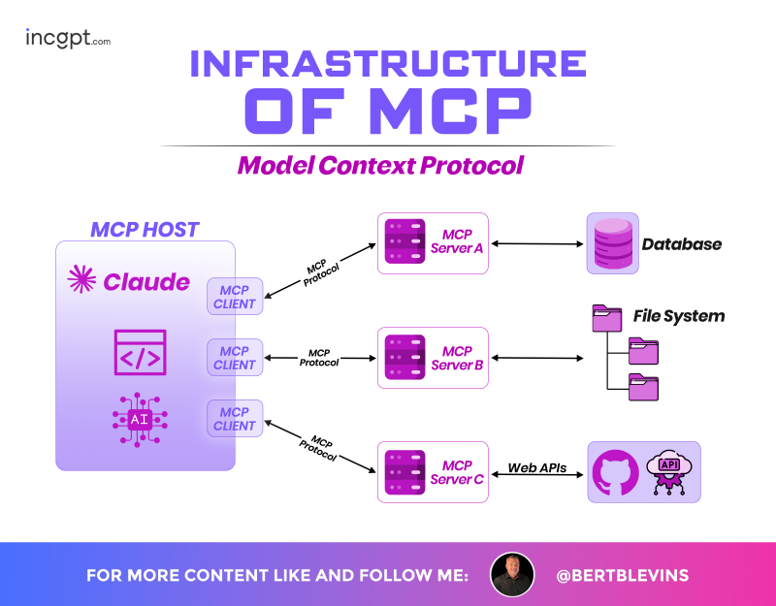
Infrastructure of MCP

Model Context Protocol

  • The Model Context Protocol (MCP) architecture shows how MCP Clients are embedded within AI hosts like Claude and ChatGPT.
  • MCP Clients communicate with the MCP Server using standardized MCP communication.
  • The MCP Server enables access to various data sources.
  • Supported data sources include files, databases, and APIs.
  • The architecture enables seamless and efficient data exchange.
  • MCP standardizes communication across AI systems and data environments.
  • Key components include tool discovery for identifying available capabilities.
  • Resource management supports organized and efficient data access.
  • Secure interactions ensure safe and trusted data exchange.

Contact Info

Lorem ipsum dolor sit amet, consectetur adipiscing elit, sed do eiusmod tempor incididunt ut labore et dolore magna aliqua. Ornare arcu odio ut sem

Choose Your Best Plan

Lorem ipsum dolor sit amet, consectetur adipiscing elit, sed do eiusmod tempor incididunt ut labore et dolore magna aliqua.

Basic Plan

Lorem ipsum dolor sit amet, consectetur adipiscing elit, sed do eiusmod

$19.99/Month

Premium Plan

Lorem ipsum dolor sit amet, consectetur adipiscing elit, sed do eiusmod

$29.99/Month

Professional Plan

Lorem ipsum dolor sit amet, consectetur adipiscing elit, sed do eiusmod

$49.99/Month

What Customer Say About Soffy

" volutpat diam ut venenatis. Convallis aenean et tortor at risus. Nec nam aliquam sem et tortor. Donec massa sapien faucibus et molestie ac feugiat. Lacinia quis "

    Spike Warren
    Spike Warren

    Design Agency Owner

    " volutpat diam ut venenatis. Convallis aenean et tortor at risus. Nec nam aliquam sem et tortor. Donec massa sapien faucibus et molestie ac feugiat. Lacinia quis "

      Lizzie Colon
      Lizzie Colon

      Web Developer

      "Lorem ipsum dolor sit amet, consectetur adipiscing elit. Suspendisse varius enim in eros elementum tristique. Duis cursus, mi quis viverra ornare, eros dolor interdum nulla, ut commodo diam libero vitae erat."

        Baldwin Holmes
        Baldwin Holmes

        Freelancer

        "Lorem ipsum dolor sit amet, consectetur adipiscing elit. Suspendisse varius enim in eros elementum tristique. Duis cursus, mi quis viverra ornare, eros dolor interdum nulla, ut commodo diam libero vitae erat."

          Pansy Elliott
          Pansy Elliott

          Design Agency Owner

          " volutpat diam ut venenatis. Convallis aenean et tortor at risus. Nec nam aliquam sem et tortor. Donec massa sapien faucibus et molestie ac feugiat. Lacinia quis "

            Ida Stanley
            Ida Stanley

            Ecommers Owner

            " volutpat diam ut venenatis. Convallis aenean et tortor at risus. Nec nam aliquam sem et tortor. Donec massa sapien faucibus et molestie ac feugiat. Lacinia quis "

              Chadler Wood
              Chadler Wood

              Freelancer

              Frequently Asked Questions

              Lorem ipsum dolor sit amet, consectetur adipiscing elit, sed do eiusmod tempor incididunt ut labore et dolore
              Lorem ipsum dolor sit amet, consectetuer adipiscing elit. Aenean commodo ligula eget dolor. Aenean massa. Cum sociis natoque penatibus et magnis dis parturient montes, nascetur ridiculus mus. Donec quam felis, ultricies nec, pellentesque eu, pretium quis, sem.

              Our Blog

              Lorem ipsum dolor sit amet, consectetur adipiscing elit, sed do eiusmod tempor incididunt ut labore et dolore magna aliqua. Ornare arcu odio ut sem